
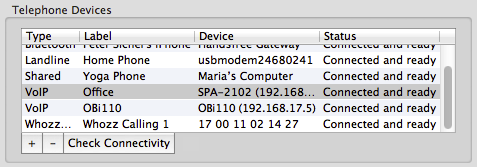
You can use Phone Amego with compatible VoIP phones or Analog Telephone Adaptors (ATAs). With an ATA you can monitor up to 8 phone lines (two lines per adaptor) at the same time for Caller ID, and use Google Voice for dialing. You can assign each VoIP adaptor a convenient label like "Office" by clicking on the Label field to edit and then pressing Enter.
ATAs
Phone Amego supports the Cisco/Linksys/Sipura family of VoIP adaptors and phones for Caller ID including the PAP2T, SPA-2000, SPA-2100, SPA-2102, SPA-3000, SPA-3102, SPA112, and SPA122 [I use the SPA-2102 and SPA112 with CallCentric and Voip.ms for testing]. If your VoIP adaptor is not listed here, it may still be compatible as described in the next section.
Phone Amego supports the OBiHAI family of VoIP adaptors for Caller ID including the OBi100, OBi110, and OBi202 which allow you make calls via Google Voice without a separate telephone service.
IP Phones
Phone Amego works with Polycom, Yealink, and Snom IP phones for both dialing and Caller ID. Phone Amego supports dialing with IP phones from Aastra and Grandstream. Some Cisco IP phones are compatible as well.
Softphones
Phone Amego works with Skype and CounterPath X-Lite 4 and Bria 3 for dialing at this time.
Other Phones and ATAs
You can use Phone Amego with any telephone adaptor that provides one or more analog phone ports by connecting through a USB modem, a multi-line call monitoring device (see Landline and Caller ID Sharing), or a voice service bridge like the OBi110 that includes a telephone Line (FXO) port (by attaching the analog phone port of your unsupported adaptor to the Line port of the OBi110).
For IP phones or adaptors that don't support dialing directly from your computer, you may be able to dial using a compatible web service such as Vonage, CallCentric, or Cisco WebDialer. See Generic Dial URLs.
ISP Supplied Adaptor
Many Internet Telephone Service Providers (ITSPs) will supply a pre-configured VoIP adaptor locked to their service. This is generally preferred by those new to VoIP service since no configuration is required. The "user" password (if needed) is often available upon request to fine tune your configuration. The "admin" password that allows you to unlock the device to work with another provider may be closely guarded, or available to long time customers depending on your circumstances.
Vonage Notes
Vonage service is locked to a specific VoIP adaptor unless you pay extra for a "soft phone" account. I tested support for the V-Portal adaptor, but it does not yet provide a method to retrieve the caller ID information.
You can use a telephone line splitter along with a compatible USB modem connected to the analog phone port on your Vonage adaptor and treat it just like a landline for dialing and caller ID.
After more than a year of nudging Vonage, I've come to believe that supporting 3rd party developers to enable CTI is not on their agenda (Vonage recently shutdown their click-to-dial service). If you are open to alternatives that support standard SIP based VoIP, you can lower your phone bill significantly while gaining greater flexibility. See Internet Telephone Service Providers and Choosing a SIP Phone for CTI.
Bring Your Own Device (BYOD)
Some ITSPs allow you to supply your own adaptor. This is often preferred by experienced VoIP users and professionals since it allows you to pick the best equipment and customize it to meet your needs. Your adaptor will be unlocked and you are free to set your own "user" and "admin" passwords as desired. The Linksys/Sipura VoIP adaptors are popular among the BYOD crowd earning high marks for call quality and flexible configuration.
Some of the original team behind the Sipura ATA have since formed a new company (OBiHAI Technology) to build next generation VoIP adaptors. The OBi110 allows you to bridge up to four telephone services (including Google Voice, iPhones, iPod Touch, and iPad via WiFi). The OBi adaptors also feature a web based personal configuration portal to simplify configuring the device.
Q: Can I get Internet based VoIP phone service for free in the US?
A: Kind of if your needs are modest. You can get a free Direct Inward Dial (DID) number from sipgate.com that works with standard SIP phones or VoIP telephone adaptors. By combining this with Google Voice for outbound dialing you can effectively have nationwide phone service with no monthly charge. You must provide your own Internet connection and will need a cell phone to sign up. The sipgate service is offered AS IS for single line residential use only, and may be withdrawn at any time.
Another option is to get an OBiHAI telephone adaptor that allows you to use a standard telephone with Google Voice directly.